 Piclash
Warp and curve text online, free
Curve text into an arc or circle, or warp it with wave, flag, bulge and mesh effects, and keep it editable. Free in your browser, with glow, outline and shadow.
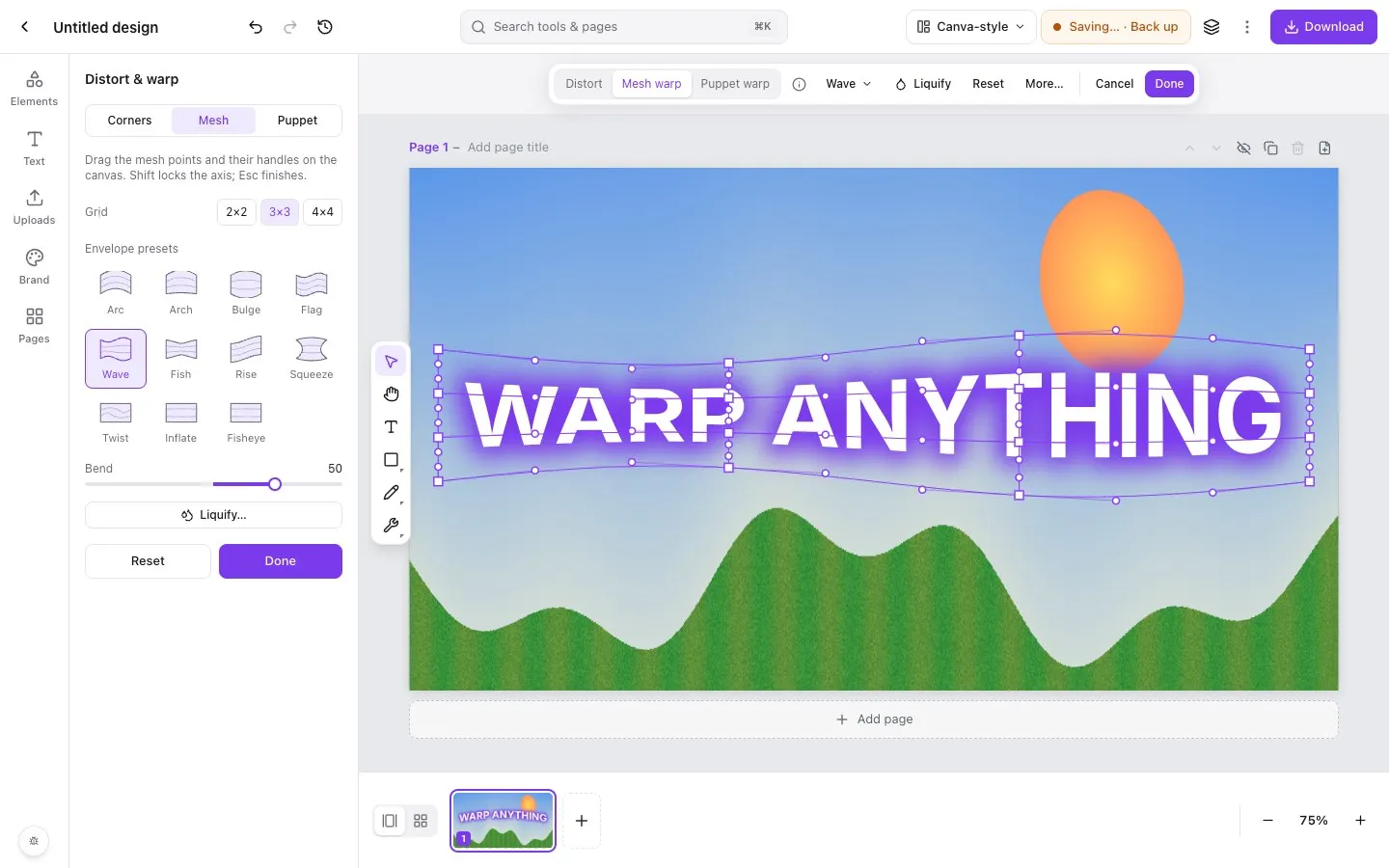
Step by step in Piclash
- 1Add a headingOpen Piclash, choose Text in the left rail and click Add a heading. Type your words.
- 2Open EffectsWith the text selected, click Effects on the toolbar. Turn on Curve for a simple arc or circle, and use the slider to bend it up or down.
- 3Warp itFor more shapes, choose Warp text: arc, flag, mesh. Pick a preset such as Arc, Wave, Flag, Bulge or Fish, set the Bend, or drag the mesh points by hand.
- 4Style and downloadAdd a glow, outline or shadow in the same Effects panel, then Download as PNG with a transparent background, or keep designing around it.
A straight headline is fine. A headline that arcs over a photo, flies like a flag or bulges off the page gets noticed. Piclash does both simple curves and full warps on live text.
Curve or warp?
- Curve bends the line of text along an arc, up to a full circle, without changing the letters. It suits badges, logos and stickers.
- Warp reshapes the letters themselves with an envelope or mesh. Use it for arc and arch, wave, flag, bulge, fish, rise, squeeze, twist, inflate and fisheye effects, or drag the mesh for something custom.
Make it pop
Warped text pairs well with the other text effects in the same panel: glow, outline, shadow and a background box. They follow the warp exactly. The screenshot above is a wave warp with a purple glow, a combination you’d usually need a desktop app for.
Fonts
Choose from a library of web fonts, or set your brand fonts in Brand so they’re always at hand. Warps work with any font.
Questions
Can I still edit the words after warping?
Yes. The text stays live. Double-click to change it and the warp reshapes around the new words.
How do I make circular text?
Turn on Curve in Effects and push the slider to the end. The text wraps around a circle. Use a negative value to curve it the other way.
Can I download warped text with a transparent background?
Yes. Hide or delete the background, then Download as PNG. Transparency is kept.
Try it on your own design
Free, nothing to install, and your work stays on your device.
Related
- How to warp text in CanvaCanva's Curve effect for arcs, and how to get wave, flag, bulge and mesh warps on editable text.
- Warp an image online, freeMesh warp, envelope presets (arc, bulge, flag, wave…) and puppet warp on photos, shapes and text.
- Make YouTube thumbnails that stand out, free1280×720 canvas, glowing warped text, one-click cut-outs, and a PNG with no watermark.
- Liquify a photo online, freePush, twirl, pinch and bloat pixels with a brush, and freeze the parts you want to keep.