 Piclash
Prefer Photoshop's layout? Switch to it.
Piclash has an optional Photoshop-style workspace with a tool column, an options bar, a Layers dock and Photoshop's shortcuts. Free, in your browser.
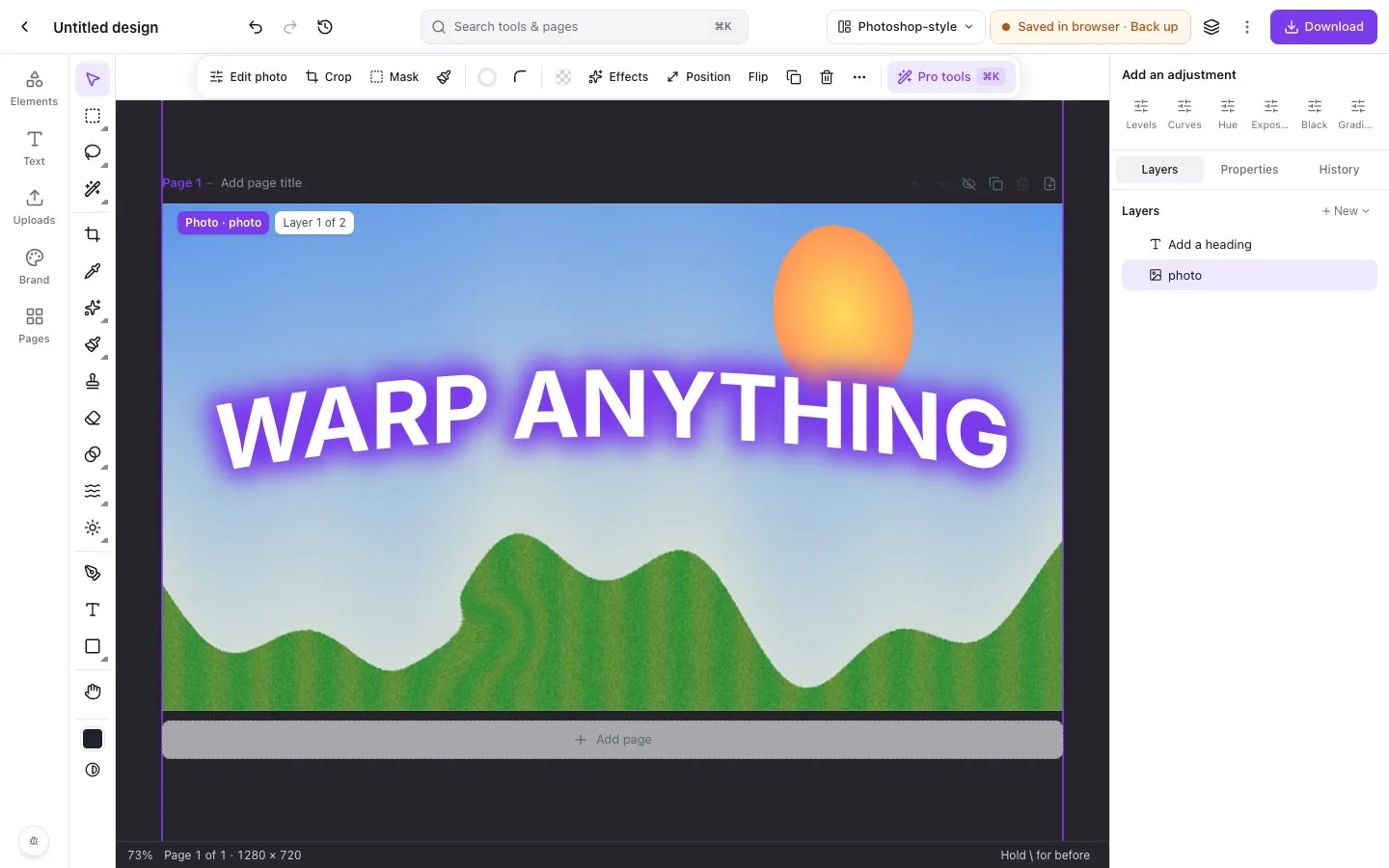
Piclash starts out Canva-simple: panels on the left, a toolbar that follows what you select, and pro tools one search away. If your hands already know Photoshop, you don’t have to relearn anything. Switch to the Photoshop-style workspace and the editor rearranges itself:
- One tool column on the left, in Photoshop’s order, with corner flyouts for tool groups.
- An options bar across the top for the active tool: brush size and hardness, healing source and alignment, selection mode, feather and tolerance, liquify settings.
- A dock on the right with Add an adjustment (adjustment layers) above Layers, Properties and History.
- A status bar with zoom, the page and a hint for the current tool.
- A dark pasteboard around the page, so the image stands out.
What’s in the toolbox
Selections (marquee, lasso, polygonal lasso, magic wand, select subject, colour range, quick mask), crop and perspective crop, eyedropper, spot healing, healing brush, patch, red-eye, brush and eraser, clone stamp, gradient and paint bucket, dodge, burn and sponge, blur, sharpen and smudge, text, shapes and pen. Warps (mesh, puppet, envelope and liquify) and layer styles such as stroke, bevel and inner glow are in the same editor.
Why not just use Photoshop?
If you edit photos all day, Photoshop is still the deeper tool. Piclash is for when you want those tools without an install or a subscription, when you’re starting from a Canva design, or when you need a quick, careful edit on someone else’s computer. See the Photoshop alternative comparison for an honest side-by-side.
Questions
How do I switch between the two layouts?
Use the workspace menu at the top of the editor (it says Canva-style or Photoshop-style). You can also search for it with Ctrl+K or Cmd+K. Your choice is remembered.
Do the keyboard shortcuts match Photoshop?
The main ones do: M marquee, L lasso, W magic wand, C crop, I eyedropper, J healing, B brush, S clone, E eraser, G gradient, O dodge and burn, T text, U shapes, H hand and Q quick mask. Pressing a key again cycles through that tool group, as in Photoshop.
Is it a different editor?
No. It's the same editor and the same design, laid out differently. You can switch in the middle of a design.
Try it on your own design
Free, nothing to install, and your work stays on your device.
Related
- A free Photoshop alternative in your browserLayers, masks, healing, curves, liquify and puppet warp, with Photoshop's layout and shortcuts.
- A free online photo editor with layers, masks and blend modesLayers, masks, adjustment layers, blend modes and layer styles, in a browser tab.
- Curves, levels and HSL online, freeTone curves, levels with a histogram, HSL, LUT looks and adjustment layers.
- Bring your Canva designs into Piclash, still editablePages, text, shapes and your photos come across as editable layers, not a flat picture.