 Piclash
Warp an image online, free
Bend, bulge and reshape photos and graphics with a mesh warp, envelope presets and puppet warp, right in your browser. Free, no sign-up, and the warp stays editable.
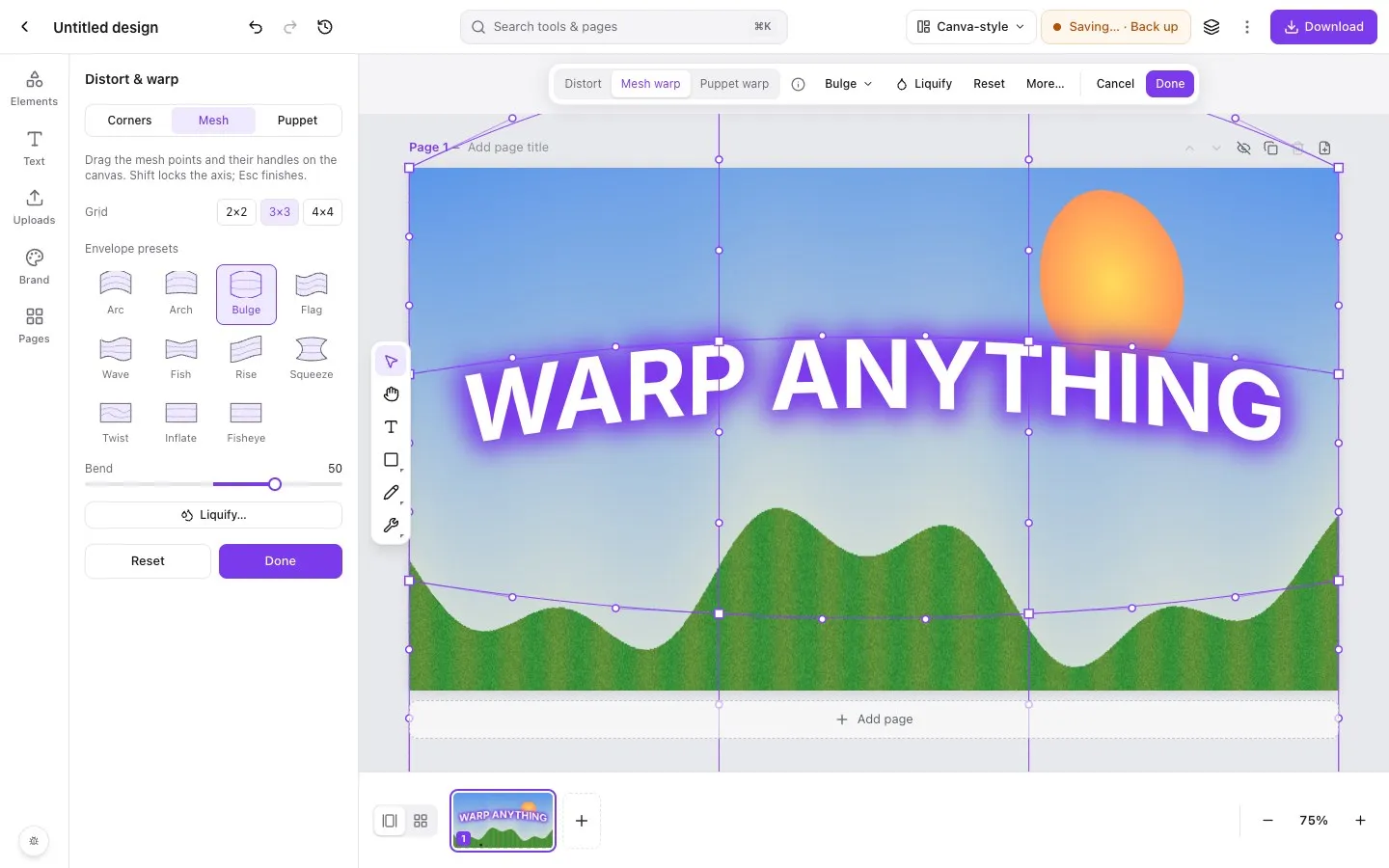
Step by step in Piclash
- 1Add your imageOpen Piclash, pick a size (or open a design), then drag your photo onto the page or add it from Uploads.
- 2Open Distort & warpSelect the image, open the … menu on the toolbar and choose Distort & warp. Pro tools (Ctrl+K or Cmd+K) → Mesh also works.
- 3Start from a preset, or drag the meshPick an envelope preset (Arc, Arch, Bulge, Flag, Wave, Fish, Rise, Squeeze, Twist, Inflate or Fisheye) and set the Bend. Or drag the grid points and their handles yourself; choose a 2×2, 3×3 or 4×4 grid.
- 4FinishClick Done. The warp stays editable: open Distort & warp again any time to change it or reset it.
Warping is how you wrap a logo around a mug mockup, bend a photo into a banner, or give a headline real energy. Most free online editors can only rotate and skew. Piclash has the full set of warps from desktop photo editors, in a browser tab.
Three ways to warp
- Envelope presets are the fast way: arc, arch, bulge, flag, wave, fish, rise, squeeze, twist, inflate and fisheye. One Bend slider controls the strength.
- Mesh warp puts a grid over the image. Drag any point or its curve handles for precise, smooth distortions. Start from a preset and then fine-tune the mesh.
- Corners (distort) moves the four corners on their own, for perspective. That’s how you fit a picture onto a sign or a screen in a photo.
For pushing pixels around freely, use liquify. For moving parts of an image around pins, use puppet warp.
It doesn’t lose quality
The warp is drawn from the original image every time, so you can warp, unwarp and warp again without the photo getting softer. The same goes for warps on text, which stays crisp and editable.
Works with Canva designs
If your design started in Canva, import it and warp its photos and text here. Canva doesn’t have a built-in mesh warp; see how to warp an image in Canva.
Questions
Is the warp destructive?
No. Piclash keeps the original image and stores the warp as an editable mesh, so you can come back and adjust it or remove it.
Can I warp text and shapes, not just photos?
Yes. Text stays editable while warped, so you can fix a typo without redoing the warp. Shapes, frames and groups warp too.
What's the difference between mesh warp and puppet warp?
Mesh warp bends the whole object with a grid, which suits curves, bulges and envelope shapes. Puppet warp lets you pin points and drag parts of the image around them, like posing an arm. See the puppet warp tool.
Is there a watermark?
No. Download a PNG, JPG, PDF or SVG at full quality, free.
Try it on your own design
Free, nothing to install, and your work stays on your device.
Related
- Puppet warp online, freePin points on an image, then drag to bend arms, tails, banners and text naturally.
- Liquify a photo online, freePush, twirl, pinch and bloat pixels with a brush, and freeze the parts you want to keep.
- Warp and curve text online, freeCurve text, or warp it with arc, wave, flag, bulge and mesh, and it stays editable.
- How to warp an image in CanvaWhat Canva can do with apps, and how to get a real mesh, envelope or puppet warp on a Canva design.