 Piclash
A free Photoshop alternative in your browser
Photoshop-style layers, masks, healing, curves, liquify and puppet warp, free in your browser, with Photoshop's layout and shortcuts. No install, no account.
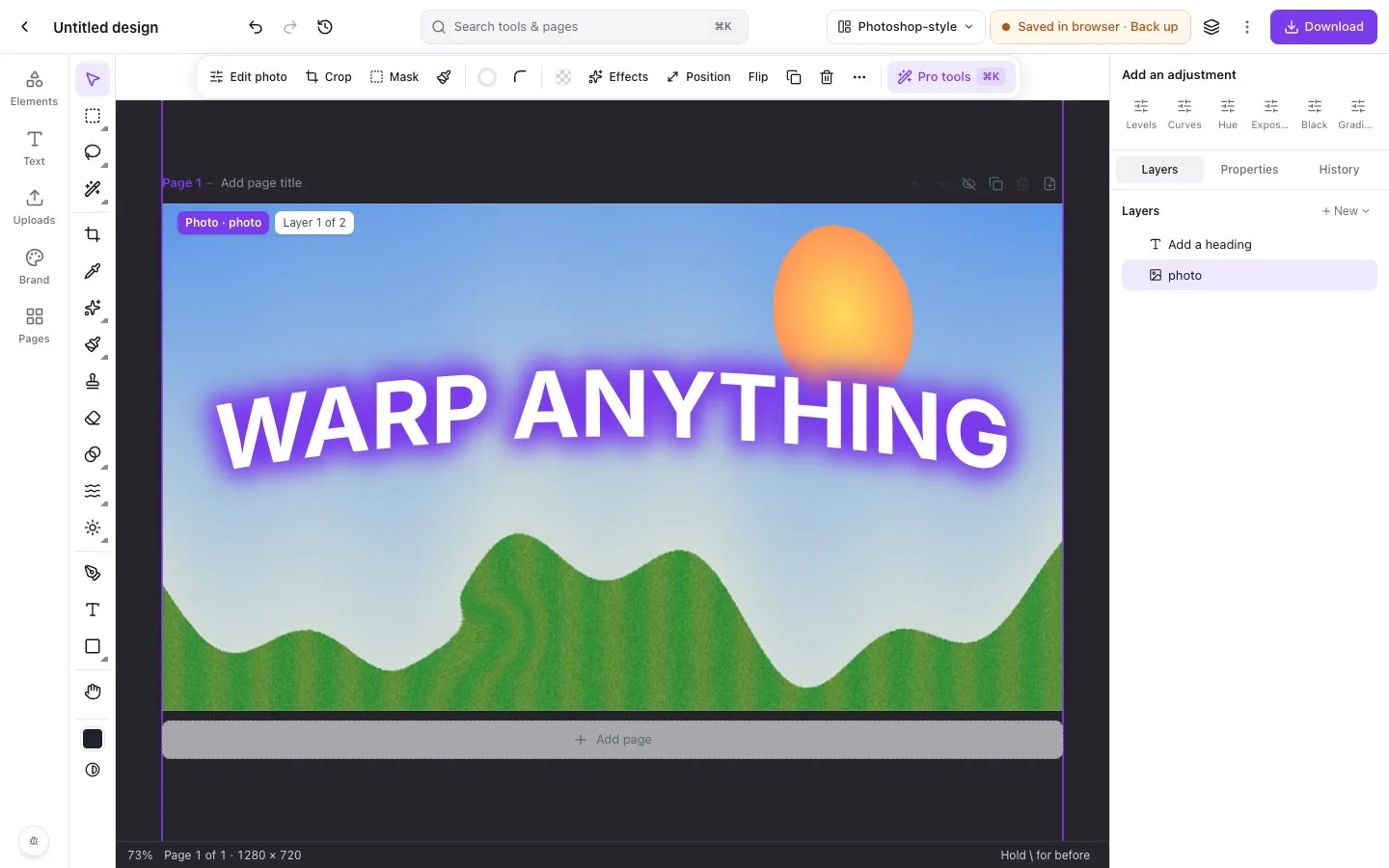
Photoshop is the standard, and a subscription. If you need its core tools a few times a month, or on a computer where you can’t install anything, a browser tab is enough.
What Piclash has from Photoshop’s toolbox
- Layers: layer masks, clipping, groups, opacity and the full set of blend modes.
- Adjustment layers: curves, levels, HSL, LUTs, exposure and more, with a histogram.
- Selections: marquee, lasso, polygonal lasso, magic wand, select subject, colour range, refine edge and quick mask.
- Retouching: spot healing, healing brush, patch, clone stamp, content-aware fill, red-eye, dodge, burn, sponge, blur, sharpen and smudge.
- Transform and warp: perspective distort, mesh warp with envelope presets, puppet warp and liquify.
- Painting: brush, eraser, gradient and paint bucket.
- Layer styles: stroke, drop and inner shadow, outer and inner glow, bevel and emboss, overlays.
- Filters: blurs, sharpen, noise and stylise.
- Background removal, on your device.
Switch on the Photoshop-style workspace for a tool column, an options bar, a Layers dock and Photoshop’s shortcuts.
How the free options compare
| Photoshop | Affinity | GIMP | Photopea | Piclash | |
|---|---|---|---|---|---|
| Price | Subscription | Free with a Canva account | Free, open source | Free with ads, or Premium | Free |
| Runs | Desktop (plus web) | Desktop | Desktop | Browser | Browser |
| Account | Adobe ID | Canva account | None | None (optional) | None |
| PSD files | Native | Opens and saves | Opens, partial | Strong | Not yet |
| Canva design import | No | No | No | No | Yes, with layers |
| Page layout and design | Basic | Strong | Basic | Basic | Strong (multi-page) |
| Non-destructive warps | Yes | Yes | Partial | Partial | Yes |
Based on each product as of October 2026.
Honest limits
Piclash doesn’t do RAW development, CMYK print workflows, actions, batch processing, plug-ins, 3D, video or generative fill. It’s designed for design and photo work that ends up on screens, in documents and in print-ready PDFs, without the install.
Questions
Can Piclash replace Photoshop?
For a lot of everyday work, yes: retouching, colour correction, cut-outs, compositing, warps and design. Photoshop goes deeper in RAW development, actions and batch processing, plug-ins, 3D, video, generative AI and print colour management. If you depend on those, keep Photoshop.
Does it use Photoshop's shortcuts?
Yes, in the Photoshop-style workspace: M, L, W, C, I, J, B, S, E, G, O, T, U, H, Q and more, with repeat presses cycling through a tool group.
Does it open PSD files?
Not yet; PSD import is on the roadmap. Piclash opens its own .design files, Canva designs (through the importer), PowerPoint files and images.
What about Affinity, GIMP and Photopea?
Affinity (now free with a Canva account) and GIMP are capable desktop apps you install. Photopea runs in the browser and is strongest with PSD files. Piclash runs in the browser with no account, and combines photo editing with Canva-style page design and Canva import.
Try it on your own design
Free, nothing to install, and your work stays on your device.
Related
- Prefer Photoshop's layout? Switch to it.Tool column, options bar, Layers dock and Photoshop's keyboard shortcuts, one click away.
- A Photopea alternative, with no ads and Canva-style designBrowser-based like Photopea, with no ads, a modern layout, multi-page design and Canva import.
- Canva vs Photoshop: which one do you actually need?What each does best, where each falls short, and a free middle option that does some of both.
- A free online photo editor with layers, masks and blend modesLayers, masks, adjustment layers, blend modes and layer styles, in a browser tab.